> For the complete documentation index, see [llms.txt](https://docs.datasuite.vn/llms.txt). Markdown versions of documentation pages are available by appending `.md` to page URLs; this page is available as [Markdown](https://docs.datasuite.vn/cac-tinh-nang/report/tao-moi-report.md).
# Tạo mới Report
Bạn cần hoàn tất [Xây dựng các Dataset](/khoi-dau-nhanh-voi-data-suite/tutorial/xay-dung-cac-dataset.md) và [Xây dựng Data Model](/khoi-dau-nhanh-voi-data-suite/tutorial/xay-dung-data-model.md) trước khi thực hiện các bước dưới đây.
Bạn có thể tạo mới một Report theo ba cách sau:
### **Tạo Report trực tiếp từ Data Model**
{% stepper %}
{% step %}
#### Tạo Report
Mở Data Model vừa tạo và nhấn Create Report
{% endstep %}
{% step %}
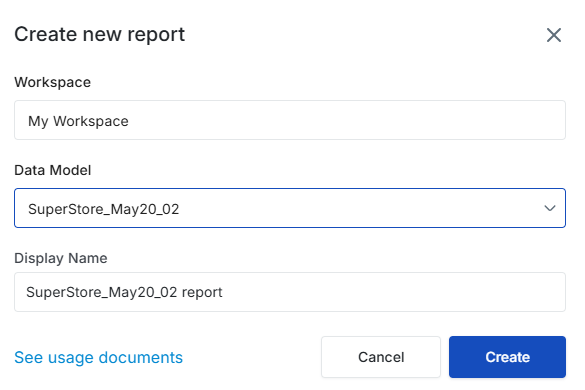
Hoàn tất khởi tạo
Xem xét thông tin và bấm Create để hoàn tất. Bạn có thể chỉnh sửa tên của Report tại bước này nếu muốn.
{% endstep %}
{% endstepper %}
### **Tạo Report khi truy cập danh sách Report**
{% stepper %}
{% step %}
#### Truy cập Danh sách Report
Truy cập danh sách Report và nhấn Create Report > Use Existing Data Model.
{% endstep %}
{% step %}
#### Chọn Data Model
Chọn Data Model bạn đã tạo trước đó. Hệ thống sẽ tự động tạo tên mặc định cho Report mới; bạn có thể đổi tên theo nhu cầu.
{% endstep %}
{% step %}
#### Hoàn tất khởi tạo
Nhấn **Create** để hoàn tất quá trình.
{% endstep %}
{% step %}
#### Chỉnh sửa Report
Hệ thống sẽ tự động chuyển tiếp bạn tới trang Chỉnh sửa Report.
{% endstep %}
{% endstepper %}